CDJ vs DJ Controller Which Is Better for Your DJ Setup
.jpg/v1/fill/w_320,h_320/file.jpg)
Choosing between CDJs and a DJ controller is one of the first serious setup decisions a DJ makes. Both can run a great set, both can sound professional, and both can teach you real DJ skills. The better choice comes down to where you play, how you practise, what you can carry, and how much you want to spend.
A CDJ setup feels close to the booth layout used in many clubs and festivals. A controller gives you more for less money, especially if you mix at home, play private events, or rely on laptop-based software.

What makes CDJs different from DJ controllers
A CDJ is a standalone digital media player. You plug in a USB drive, load analysed tracks, and control each deck from dedicated hardware. Most club setups pair two or more CDJs with a separate DJ mixer.
A DJ controller is usually a hardware surface that controls DJ software on a laptop. The controller gives you jog wheels, faders, pads, knobs, and performance controls, while the laptop handles the music library, waveforms, effects, and playback engine.
Some modern controllers can work without a laptop, and some media players have touchscreens and advanced features. Still, the basic difference remains simple:
CDJ setup | DJ controller setup |
Usually built around standalone players and a mixer | Usually built around a controller and laptop |
Common in clubs and larger venues | Common at home, mobile gigs, and small events |
Higher cost and more separate parts | Lower cost and more features in one unit |
Trains you for standard booth layouts | Gives you fast access to software tools |
Neither option is a shortcut. A skilled DJ can make either setup sound clean, musical, and exciting.
CDJs are best when you want a club-style workflow
CDJs make sense if your goal is to play in clubs, lounges, festivals, or venues that already provide a booth. In many professional spaces, the DJ arrives with prepared USB drives rather than a full setup.
That changes how you prepare. You organise playlists, set cue points, analyse tracks, and export them from compatible DJ software. Once you reach the venue, you plug in and play.
The main benefit is familiarity under pressure. If you practise on CDJs or similar standalone players, a club booth feels less intimidating. You already know where the play, cue, tempo, loop, and browse controls live. You also learn to mix with less dependence on a laptop screen.
CDJs also tend to feel solid. The jog wheels are large, the controls have space around them, and a separate mixer gives you a clear layout. For long sets, that can feel more comfortable than a very compact controller.
The trade-off is cost. A full CDJ-style setup needs at least two media players and a mixer. Add headphones, speakers, storage drives, and possibly cases, and the budget rises quickly. It is also less portable than a single controller.
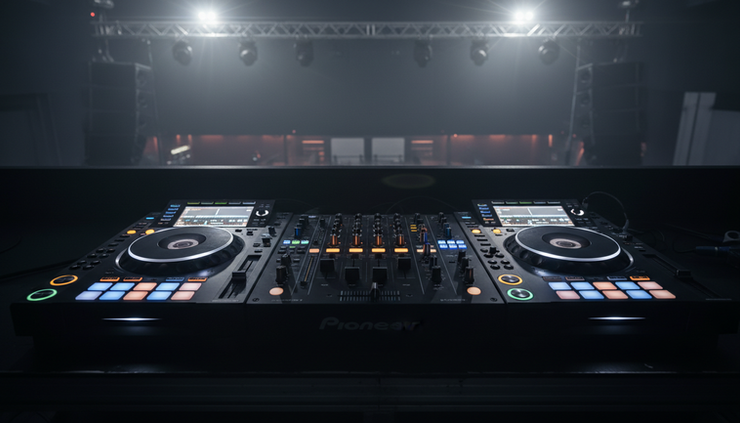
DJ controllers are best when you want value and flexibility
A DJ controller is often the smartest starting point. For one purchase, you can get two or four deck control, mixer sections, performance pads, effects, looping, hot cues, and library browsing.
That makes controllers excellent for:
Learning the basics at home
Recording practice mixes
Playing house parties and private events
Mobile DJ work
Testing different software workflows
Travelling with a lighter setup
Controllers also make music management easier. Your library sits on your laptop, so searching, sorting, tagging, and building playlists can feel fast. If you play open-format sets, such as Afrobeats, hip-hop, dancehall, Arabic pop, house, and commercial tracks in one night, quick searching can matter.
A controller also gives you room to experiment. Performance pads can trigger hot cues, samples, loops, slicer modes, and stems, depending on the software. These tools are useful when you want to build edits on the fly or add energy to transitions.
The main drawback is laptop dependence. If the laptop crashes, overheats, or has battery issues, the set can suffer. Good preparation reduces that risk, but it is still part of the controller workflow.
Sound, feel, and reliability matter more than the label
The debate around CDJ vs DJ Controller often gets too emotional. Some DJs treat CDJs as “real” DJ gear and controllers as beginner tools. That view is outdated.
What matters is whether the setup lets you mix cleanly, monitor properly, and perform without distractions.
Sound quality depends on the audio hardware, file quality, gain staging, and speaker system. A poorly set up premium rig can sound harsh. A well managed controller setup can sound excellent. Keep your trim levels clean, avoid redlining the mixer, and use good audio files.
Feel is more personal. CDJs usually have larger jog wheels and more spacing. Controllers vary widely. Entry-level models can feel cramped, while larger controllers can feel close to a full booth layout.
Reliability comes from preparation:
What to check | Why it matters |
Music files | Corrupt or missing tracks can interrupt a set |
USB drives or laptop | Your playback source must be stable |
Power supply | Loose adapters and weak batteries cause stress |
Cables | Bad audio cables can ruin the sound |
Backup plan | A spare USB or emergency playlist can save the night |

How to choose the right setup for your situation
If you are starting from zero, a controller is usually the better first buy. It costs less, takes less space, and gives you everything needed to learn beatmatching, phrasing, EQ, filters, loops, and set building.
Choose a DJ controller if you:
Practise mostly at home
Need a portable setup
Play private parties or small venues
Want the most features for your budget
Like using a laptop for search and library control
Choose CDJs or standalone media players if you:
Want to prepare for club booths
Prefer playing without a laptop
Have the budget for separate players and a mixer
Care about a full-size professional layout
Play venues where USB-based setups are standard
There is also a strong middle path. Some standalone all-in-one systems combine the feel of CDJs with the convenience of a controller-style unit. They cost more than entry-level controllers, but less than a full multi-player club setup. For many serious home DJs, that middle category is worth considering.
If space is tight, think practically. A controller can fit into a bedroom or small studio corner. A full CDJ setup needs a stable table, cable management, speaker placement, and room to stand comfortably. In apartments across the UAE, that size difference can be the deciding factor.

The better setup is the one you will use often
CDJs are the better choice for DJs who want a club-ready workflow, full-size controls, and a setup that mirrors professional booths. A DJ controller is the better choice for DJs who want affordability, portability, software power, and fast home practice.
If budget is no issue and club work is the goal, go for a CDJ-style setup. If you want to build skill quickly and play more often, start with a good controller and learn the craft properly.
The gear matters, but the habits matter more. Prepare your music, practise transitions, record your mixes, and learn how to read a room. A confident DJ on a modest controller will always beat an unprepared DJ standing behind expensive decks.


Comments